

A fully charged solar generator can help you through the first hours of a blackout. Keeping essential equipment running into the next day takes more planning. The details that deserve attention are how much energy your panels can replace, whether appliances will start and stay running, and how easily your household can connect everything when the lights go out.
Battery capacity matters, but it is only one part of a workable backup plan. A useful system combines enough stored energy for immediate needs with a realistic way to recharge and a setup that everyone responsible for using it understands.
Plan for the Second Day of an Outage
A battery’s capacity tells you how much energy is stored when it is full. During a prolonged outage, the more important question becomes whether you can replace the energy you use each day.
Suppose your essential equipment consumes approximately 1,200Wh daily, while your panels deliver only 900Wh into the power station over that day. Even before accounting for charging and output losses, the system has a 300Wh daily shortfall. A larger battery can absorb that gap for longer, but it does not remove it.
This is why panel configuration deserves attention when comparing a solar generator. Look at the panels included in the kit, the station’s solar input limit, and where you could actually deploy the panels at home. A high input rating offers little benefit if the connected panels cannot approach it or spend much of the day behind a fence, tree, or neighboring building.
Charging time also needs context. Replacing 2,000Wh at an actual average input of 400W takes five hours in a simplified calculation, with additional time needed for losses and charging behavior near full capacity. At 200W, that becomes ten hours of effective charging, potentially spread across more than one day.
Rather than planning around a brief midday peak, consider the usable daylight available and the energy your equipment will consume overnight.
Prioritize Loads by Their Effect on the Battery
Emergency priorities differ between households. Refrigeration, communication, lighting, and medical equipment may all matter, but they place different demands on a battery.
A refrigerator cycles on and off. A router may draw power continuously. A phone needs occasional charging. An electric space heater can consume a large amount of energy for as long as it remains on.
For perspective, a heater drawing 1,200W continuously uses 1,200Wh in one hour. That would consume more than half the nominal capacity of a 2,000Wh battery before other loads and losses are considered. Heating deserves a separate decision rather than being added casually to a list of essentials.
Write down what must remain powered continuously and what can operate briefly. This makes the plan more flexible. Lights can be switched off in unused rooms, laptops can charge at scheduled times, and optional appliances can wait until spare energy is available.
Communication needs deserve similar attention. Keeping a router powered does not guarantee internet access if the provider’s equipment is down. Include a charged phone and an alternative way to receive local information.
Households using life-sustaining medical equipment need an established continuous-power arrangement, including appropriate backup batteries. Available wattage alone is not enough to establish suitability.
Test Appliance Behavior, Not Just the Outlet
A successful test should answer more than whether the display turns on or a phone begins charging.
Connect the plug-in appliances you intend to support and observe them working together. A refrigerator may run normally once started but require additional power when its compressor starts. That startup can happen while other equipment is already drawing electricity.
Intermittent loads also reveal settings that are easy to miss. Some power stations automatically disable AC output after a period of inactivity or very low consumption. An appliance that pauses between operating cycles may trigger that behavior. Check the relevant output timeout settings before relying on the station for refrigeration or another continuous service.
The same distinction applies to automatic backup. A unit that can charge while powering equipment does not necessarily provide seamless transfer when wall power fails. Where automatic continuation matters, check the specified transfer behavior and test the intended equipment.
For an ordinary trial, connect selected appliances directly to the power station. There is no need to disconnect the entire home to learn whether a refrigerator starts, the expected load stays within limits, and the controls behave as intended.
Work Out the Physical Connection Before an Emergency
Decide where the power station will sit, where the panels will receive sunlight, and how the cables will reach between them.
The best panel location may be farther from the appliances than expected. A cable that works beside a vehicle on a camping trip may not reach from a sunny patio to a suitable indoor battery location. Check cable length, connector compatibility, and the panel voltage limits before buying additional equipment.
Keep the battery in a dry, ventilated position away from heat sources. Outdoor-rated panels do not automatically make the power station or every connection weatherproof. Avoid routing cables across busy walkways or through places where doors will pinch them.
For household circuits, a compatible transfer arrangement installed by a qualified electrician provides a different level of integration. Manual transfer switches require someone to operate them; automatic systems need the appropriate equipment and configuration. Do not assume either feature comes with a portable battery.
Never feed power into household wiring through a wall outlet. For a direct appliance setup, use appropriately rated connections and follow the appliance’s connection requirements.
Separate Storage from Emergency Readiness
A unit stored for months and a unit kept ready for an approaching storm have different jobs.
For long-term storage, use the model’s specified charge level and maintenance interval. When severe weather is forecast, charge it for the expected task while utility power is still available. This avoids treating one storage percentage as the right answer for every situation.
Temperature also affects readiness. A battery kept in a cold garage may need to warm up before it will accept charging. Below its permitted charging temperature, protection systems may stop charging rather than simply slow it down. Place it in a suitable environment without covering ventilation openings.
Keep the charging cable, panel leads, and essential appliance connections together. A short instruction card can identify the correct output button, the priority devices, and any settings that need attention. Someone else in the household should be able to follow it.
Have a Recharge Option for Poor Solar Conditions
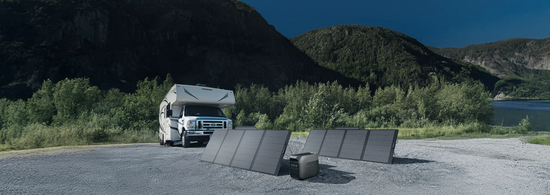
Clouds, storm damage, or an unsafe outdoor area may prevent useful solar charging. An alternative source is valuable only if you know how it connects and how quickly it can replenish the battery.
A standard vehicle accessory outlet may provide modest charging power. It can help, but refilling a large battery may take many hours. Higher-power vehicle charging requires suitable dedicated equipment.
A compatible fuel generator can also recharge a battery, allowing stored power to be used later. If this is part of the plan, operate the generator outdoors, at least 20 feet from the home, with exhaust directed away from doors, windows, and vents.
The practical question is how much usable energy each option can provide before the next period of essential use.
Conclusion
The most useful preparation is to plan through the first night and the following day. Identify the equipment that must keep working, confirm its behavior on battery power, and compare daily consumption with realistic recharge opportunities.
Before the next outage, resolve one complete setup: the battery location, panel position, connections, output settings, and backup charging method. That turns stored energy into a system your household can actually use.